Chord ai - learn any song
Machinita TechnologiesMusic & Audio
4.71.21K Reviews
- Version
- 2.8.06
- Installs
- 1.00M
- Age Rating
- Everyone
Screenshots
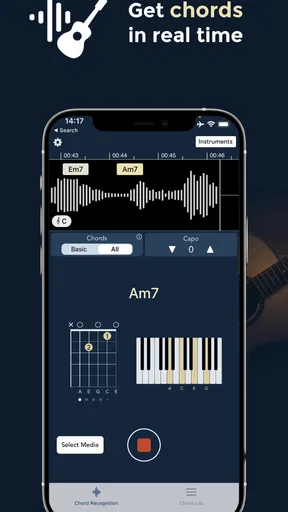
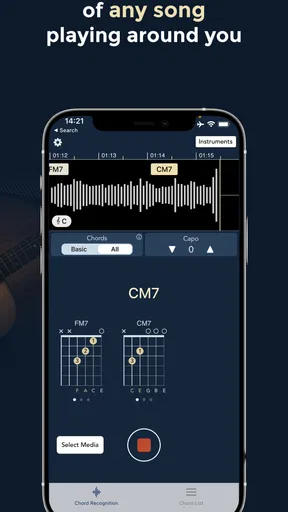
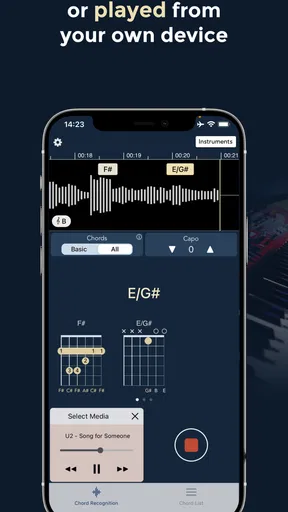
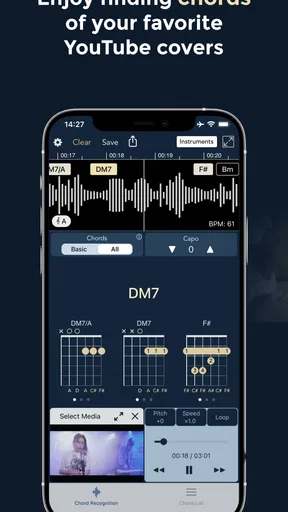
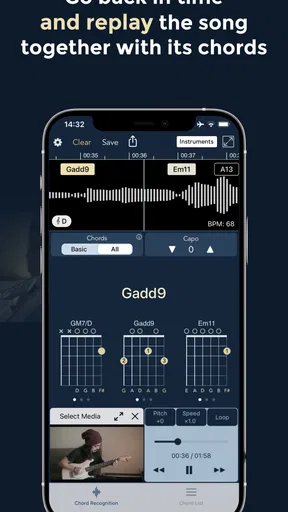
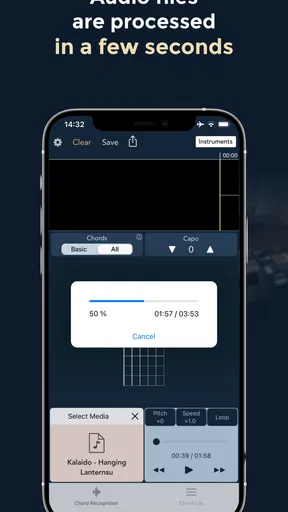
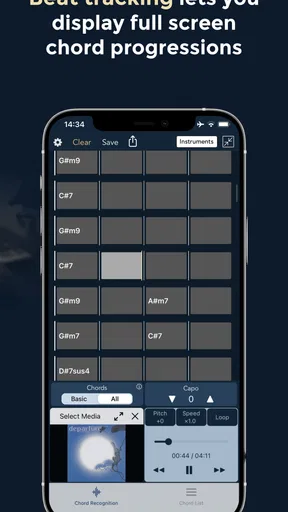
Our Review of Chord ai - learn any song
 Analysis by Appyee
I find chord-recognition apps most useful when they help me get past the first hurdle: turning a song I can hear into something I can try on an instrument. Chord ai is built around that task, using audio to identify chords and rhythm rather than asking me to search through song titles or guess by ear. That makes it appealing to beginners who want a starting point, and to experienced players who need a quick reference while learning unfamiliar material.
Who gets the most from a chord-first approach
The app makes the most sense if you already have a song in mind and want to work out its harmonic outline. A guitar player can use the detected changes as a map for a first pass; a pianist can follow the same sequence while finding comfortable voicings; and a ukulele player can see whether a song looks manageable before committing to a full practice session. It is not a replacement for learning how to listen, but it can make that learning less intimidating.
I would also consider it for a casual rehearsal. Imagine a friend suggesting a song after dinner: instead of stopping to hunt for a chart, you can try listening to the recording and use the chord display as a rough guide. The useful result is not necessarily a perfect transcription. It is a faster way to find the likely changes, test them on your instrument, and decide whether you can carry the song together.
Making the result more useful
A practical habit is to treat the first chord pass as a draft. Listen to a short stretch, note where the harmony seems to change, then play along and check whether the bass movement and melody support what you see. If a displayed chord feels wrong under your fingers, pause and compare it with the neighboring changes rather than assuming the whole analysis has failed. Audio recognition is a guide, and your own ear remains the final check.
For difficult songs, I would work in sections instead of trying to absorb the entire arrangement at once. A verse and chorus may use different progressions, and a bridge can introduce changes that are easy to miss when you are focused on keeping up with the recording. This slower workflow is especially helpful for players who are still building chord vocabulary: identify a small passage, practice the transitions, then return to the full track.
Where it differs from searching for a chord chart
Searching the web for a ready-made chart can be quicker when a popular song already has a reliable transcription. A chart also gives you a stable reference you can annotate or print. The advantage of audio analysis is that it can be useful when you are working from a song file or a recording you have at hand, rather than relying entirely on finding the right title and version online. That flexibility is valuable, though it also means you may need to listen critically and correct a result that does not fit.
Compared with a tuner or a metronome, this is a different kind of musical helper. Those tools support pitch or timing practice directly; chord analysis is more about uncovering a song’s structure. I would keep a tuner nearby for instrument setup and use a metronome when I need steady timing, while turning to this app when I want a harmonic starting point. It is strongest as one part of a practice routine, not as an all-purpose music-learning system.
What to expect before you rely on it
Chord names alone do not teach finger placement, smooth transitions, strumming patterns, or the feel of a performance. You still have to decide which voicing suits your instrument and skill level. A beginner may find a progression encouraging but then need a separate lesson or a chord reference to learn the shapes. A more advanced player may use the analysis to save time, but should still listen for inversions, passing notes, and changes that a simple chord label cannot fully explain.
Source audio matters in practice. A clear recording is easier to follow than a noisy room where several instruments overlap, and a live performance may vary from the familiar studio arrangement. If the result seems inconsistent, try a cleaner passage or analyze a short section rather than drawing a firm conclusion from one crowded moment. That is a sensible way to use any listening-based analysis without mistaking an estimate for a score written by the original musician.
Getting Started with Chord ai
First things first, downloading Chord ai is a breeze. Available on both Android and iOS, it doesn't take up much space on your device, which is always a bonus. Once installed, the app greets you with a clean and intuitive interface. No need to wade through tutorials or manuals; you can jump right in, which is exactly what I did.
The app is designed to be user-friendly, and you can tell that the developers really thought about the user experience. The main screen is straightforward: just tap the microphone icon to start analyzing any song playing around you. Whether it’s a classic rock anthem or a pop hit, Chord ai listens and delivers the chords you need.
Features That Hit the Right Notes
One of the standout features is the real-time chord detection. As the song plays, the app provides a visual representation of the chords. This is a game-changer for anyone trying to learn a song by ear. The accuracy is impressive, and it picks up even complex chords without missing a beat.
Another feature that deserves a mention is the ability to analyze songs from your device’s library. You can upload a song file, and Chord ai will break down the chords for you. This is perfect for those moments when you’re offline or working in a quiet space.
But wait, there's more! The app also includes a tempo and beat detection feature. It helps you understand the rhythm, which is crucial for getting the song’s feel just right. Plus, the app supports a variety of instruments, so whether you're strumming a guitar or playing the piano, it’s got you covered.
Putting Chord ai to the Test
I decided to test Chord ai with some of my favorite tracks. From Bob Dylan’s classics to modern hits by Ed Sheeran, the app didn’t disappoint. The chord detection was spot-on, and the beat mapping was precise. It’s like having a personal music tutor in your pocket.
One thing I appreciated was the app’s ability to handle tricky songs with unusual time signatures. It managed to decipher the complexities with ease, something that would have taken me ages to figure out on my own.
Room for Improvement?
While I’m singing praises for Chord ai, there’s always room for improvement. Occasionally, with songs that have intricate arrangements, the app might not catch every nuance. However, these instances are rare, and the app is continually updated, so I’m optimistic about future enhancements.
Another feature that could elevate the app is a community or sharing option. Imagine being able to share your chord findings with fellow musicians or getting suggestions for similar tracks. It’s not a deal-breaker, but it would add a social element to the app.
Readability, access, and everyday comfort
For me, the clearest part of the experience is the simple route from opening the app to starting an analysis. A microphone control is an understandable cue, and that matters when someone does not want to learn a complicated interface before making music. The chord display also has a practical purpose: it gives the eye a reference to follow while the ear stays on the recording. I would still take a moment to get comfortable with the screen before playing, especially if I expect to switch between looking at the phone and handling an instrument.
Different players will have different needs. A guitarist might need to glance at the phone between chord changes, while a pianist can often leave both hands on the keys and look down during a pause. For someone who finds rapid visual switching tiring, slowing the practice down and using short sections is more workable than trying to follow a whole song in real time. The app’s basic approach is easy to understand, but the physical task of playing and watching a screen remains part of the experience.
Choosing between live listening and a saved track
Live listening is convenient when a song is already playing nearby, but it puts the phone in the middle of a noisy environment. A device-library track can be a better choice when you want to repeat a passage, work alone, or keep the session focused. I would use a saved file for careful practice and reserve live analysis for quick discoveries. That small choice can make the output easier to interpret because you are not also competing with conversation or other room sounds.
There is another useful trade-off: playing audio aloud may make it easier to compare the app’s chord changes with what you hear, while headphones can help in a shared or quiet setting. Whichever approach fits the room, keep the instrument and phone positioned so you can check the display without awkwardly reaching across strings or keys. This is not a special mode; it is simply a way to make the workflow less distracting.
Limits that matter for access and accuracy
A visual chord display cannot serve every listener equally well, and audio analysis depends on a recording that the app can hear clearly. Someone who relies on sound alone may find that the visual presentation does not provide the kind of spoken guidance they need. Likewise, someone who has difficulty reading small text or distinguishing visual changes may need to check whether the display is comfortable on their own device. I would not assume that one layout works equally well for every eyesight, hearing, or motor need.
There can also be a practical barrier in the setting itself. If the phone microphone is picking up a television, people talking, or several instruments at once, the result may be less dependable than a clean recording. For a player who cannot easily hold or reposition a phone while playing, a stand or a helper can make the session more manageable, but that is an adjustment rather than an app feature. These details matter because a tool can be straightforward in principle and still be awkward in a particular room or practice position.
Chord ai is a free music and audio app from Machinita Technologies, with optional in-app purchases ranging from $2.49 to $254.99 per item. It is rated for Everyone and has a 4.8 average from around 52,000 ratings, with over 1 million installs. Version 2.7.73 requires Android 8.0 or later. Those details make it easy to see that the app is widely used, but they do not change my main advice: try the core listening workflow with a song you know well before building your practice around it.
Who should choose another tool
If your main goal is a polished, verified chord sheet for a well-known song, a dedicated chart source may be a better first stop. If you want structured lessons, instrument-specific fingering instruction, or a full practice curriculum, chord recognition alone will leave important gaps. And if you need a hands-free or highly customized presentation to make a music tool comfortable, test the interface carefully rather than assuming the simple screen will meet every requirement.
On the other hand, I would recommend giving it a try if you often hear a song and want to explore its harmony, or if you need a quick first draft before practicing with your guitar, piano, or ukulele. The strongest use is neither blind trust nor constant correction: listen, check the chord changes against the music, and use the result to guide your next attempt. That keeps the app helpful without letting the analysis replace your own musical judgement.
Wrapping It Up
In conclusion, Chord ai is a fantastic tool for anyone looking to learn songs quickly and accurately. It’s not just for beginners; even seasoned musicians will find it a valuable addition to their toolkit. The combination of real-time analysis, ease of use, and broad compatibility makes it a standout in the app world.
So, whether you’re jamming solo or in a band, Chord ai is your go-to app for mastering your favorite tunes. Give it a try, and let it transform the way you learn and play music. Happy strumming!
Verdict
Strengths of Chord ai - learn any song
- Accurate chord detection for various instruments.
- User-friendly interface with intuitive controls.
- Supports offline use, perfect for on-the-go.
- Includes a variety of song genres.
- Offers visual aids like diagrams and charts.
Limitations of Chord ai - learn any song
- Limited free version features available.
- Occasional inaccuracies with complex chords.
- Requires purchase for premium tools.
- Ads can be intrusive during use.
- No built-in metronome or tuner.
Similar Picks in This Category
View All
YouTube Music
Google LLC4.4

Samsung Music
Samsung Electronics Co., Ltd.3.8

Spotify: Music and Podcasts
Spotify AB4.3

JioSaavn - Music & Podcasts
Saavn Media Limited4.3

Lark Player:Music Player & MP3
Lark Player Studio - Music, MP3 & Video Player4.6

StarMaker: Sing Karaoke Songs
SKYWORK AI PTE. LTD.4.3
Frequently Asked Questions
What is Chord ai and how does it work?
Chord ai is an innovative app designed to help you learn songs by identifying chords and beats directly from audio files or live audio. Using advanced AI technology, it analyzes music tracks to provide accurate chord diagrams and rhythm patterns, making it an essential tool for musicians at any skill level.
Is Chord ai suitable for beginners?
Yes, Chord ai is user-friendly and perfect for beginners. The app provides clear chord diagrams and simplifies complex musical compositions, allowing users to learn and play their favorite songs with ease. Its intuitive interface ensures a smooth learning experience for those new to music.
Does Chord ai support all types of music files?
Chord ai supports a wide range of audio file formats, including MP3, WAV, and AAC. Additionally, it can analyze music from streaming services, live audio through your device’s microphone, and even YouTube videos, making it highly versatile for all your song-learning needs.
What features make Chord ai stand out from other music apps?
Chord ai offers a unique combination of features such as real-time chord recognition, beat tracking, and an extensive library of chord diagrams. Its AI-driven analysis provides precise results, and the app’s ability to handle live audio input sets it apart from other music learning applications.
Is Chord ai available for both Android and iOS?
Yes, Chord ai is available for download on both Android and iOS platforms. It can be found on the Google Play Store and the Apple App Store, ensuring compatibility with a wide range of smartphones and tablets, making it accessible to a broad audience of music enthusiasts.
